
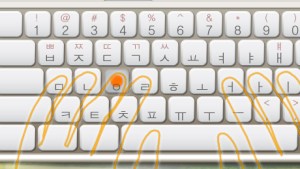
 Practicing typing Korean has been the easiest part of learning Korean language for me so far, and the one where I could see the improvement the fastest. Hangul, the Korean alphabet, has only 24 letters so it’s pretty straightforward to input it with any keyboard.
The difficult part is learning to not type the way I did – searching for every letter for minutes and then proudly punching it in with my index finger. It took me forever to type a decent sentence. I sped up a bit after I had been practicing vocabulary online for a while, but it still took way too long.
Putting keyboard stickers on the keys to see where each Korean letter helped a bit, but not much.
Memorizing the Korean keyboard layout and learning how to type without looking was what I needed to do. But I put it off for a long time. I just wanted to be able to understand Korean language as soon as possible and I didn’t think knowing how to type fast would be of much use, especially considering how much effort it seemed to take.
I was wrong.
After two weeks of forcing myself to touch type (typing without the use of sight to identify the keyboard keys) and to use all ten fingers to type Hangul I can say my speed increased tremendously. Which also improved the speed with which I learn vocabulary since now I just concentrate on the words themselves.
The funny thing is, I still don’t know how to touch type English, nor my own language.
So, how did I learn how to touch type Korean?
By using a nice little program that Kimchi Man got for me ages ago. It’s called Hancom Typing Training and it’s completely free. You can download it here:
Hancom Typing Training (한컴 타자연습)
The only problem is that the program is completely in Korean so if you’re just a beginner you will be lost in it. I did my best to translate it to English so you can find your way around. Fair warning, though, I don’t speak Korean! (Yet ;) ) So my translation is a rough guess. But hopefully it will be enough to help you find your way around and learn how to type Korean without looking at the keys. So basically this is your cheat-sheet to Hancom Typing Training English version ;)

First you need to register a user name, choose your avatar and set the targeted speed and accuracy. Don’t worry about these last two too much because as far as I could tell the only consequence of not reaching your target was a pop-up message you can easily dismiss.

At the start screen just select your username and click the large red button to start typing.

The next selection screen will give you the option to choose which part of the keyboard you wish to practice next. The bottom bar shows you the current settings which you can adjust by clicking on the gears on the right. Subeolsik is the most commonly used keyboard layout in Korea and the only national standard so it’s best to stick to it unless you have some special reason not to.  Once you start the exercise, it is quite self-explanatory. The position your hands need to be in, the finger you should use to press the key, and which key to press are all obvious from the sketch. Try to keep your hands exactly as shown even though in the beginning it might feel like your brain is going to melt and you have no control over your hands.
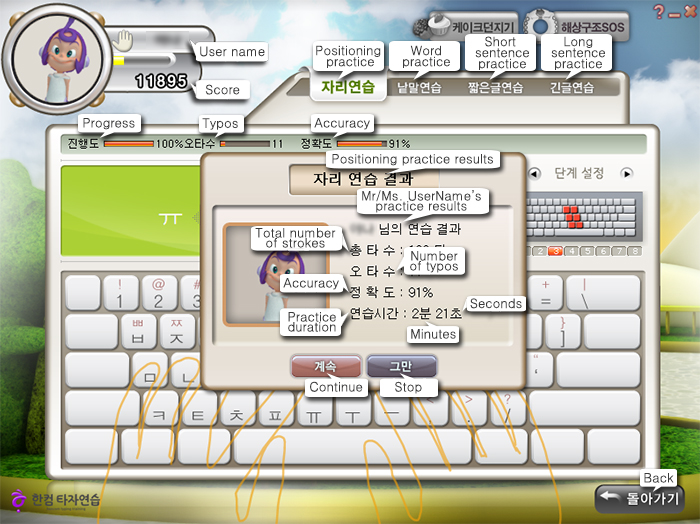
When you finish each step a window will pop up with your stats. The faster and more accurate you get, the better, of course.
 When you reach enough points you will level up. As far as I could tell, I leveled up to maximum level long time before I could actually type well so I don’t think it means much. Or maybe I’m just a really slow learner.


The Word practice part of the program requires you to type our a whole Korean word, instead of just individual letters. Here, by choosing the phase you choose which part of the keyboard you will concentrate your practice on, but of course you will need to use other letters as well to form proper Korean words.


Short sentence practice is actually no different than the rest. Naturally, press Space between words, and Enter at the end of the sentence.


Once you learn how to type a bit, you have two games to choose from, Cake Throwing and Marine Rescue SOS. In both of them you progress by typing Korean words. That way you can practice while having fun. :)
Trust me, once you’re typing Korean quickly, without even glancing at the keyboard, you will feel so cool it will be worth the effort. I hope I’ve made it clear enough so that you can now practice on your own and become a Korean master typist in no time. If something is not clear or you have trouble with the program feel free to ask in the comments.
More in this series:
- Make a plan for learning Korean
- Typing Hangul part 1 – Korean keyboard stickers
- Typing Hangul Part 3 – MoAKey the Android touchscreen Korean keyboard




 Loving Korean
Leave a reply to Tiffany Cancel reply